

Just got your new Oticon Reveal hearing aids? Knowing how to use, charge and look after them properly can make all the difference to your experience. From understanding the controls and connecting to your phone, to changing wax filters and keeping them clean, there are a few simple things worth knowing.
I’m Matthew Allsop, and I run London’s largest independent hearing clinic, Harley Street Hearing. I work with hearing technology every day, and in this guide I’ll share my practical advice on getting the best out of your new Oticon Reveal hearing aids.
Getting to Know Your Oticon Reveal Hearing Aids
Before exploring the features, it’s helpful to understand the different parts of your hearing aids and what they do.
Microphone Ports and Push Button
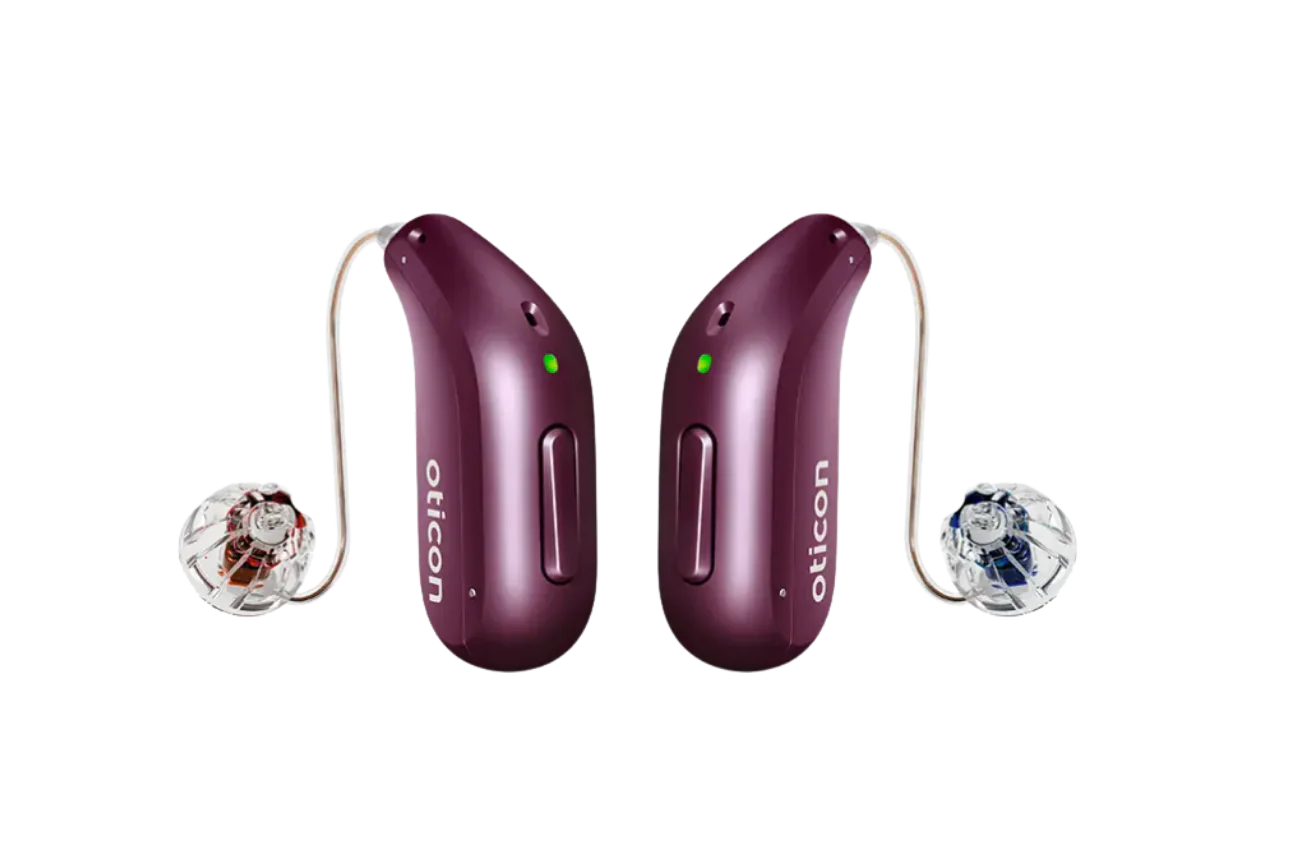
On the part of the hearing aid that sits behind your ear, you’ll notice three openings. These are the microphone ports, which allow sound to enter your hearing aids from all directions.
It’s important to keep these clean, as they can become blocked with dead skin and debris.
You’ll also find a push button, which can be programmed by your audiologist to perform different functions, including adjusting the volume, changing listening programmes and answering phone calls.
Oticon’s default volume setting is:
- A short press of the left hearing aid turns the volume down on both devices.
- A short press of the right hearing aid turns the volume up on both devices.
You can also use the button to switch your hearing aids on and off. Hold it down for three seconds to turn each device off or back on again. You’ll need to do this individually for each hearing aid.
LED Indicator and Left and Right Markers
Just above the push button, you’ll find a small LED light indicating the charging status of your hearing aid. It can also provide a visual warning when the battery is running low.
To distinguish between your devices, look for the coloured markers:
- Blue: Left hearing aid.
- Red: Right hearing aid.
Receiver Wire and Retention Lock
The receiver wire connects the hearing aid to the speaker, which sits inside your ear. Depending on your hearing loss, you may have a dome, Grip Tip, LiteTip or micromould.
You’ll also notice a small piece of plastic called a retention lock, sometimes known as a sports lock.
In my opinion, these are essential for keeping your hearing aids securely in place. If you don’t already have one fitted, I’d recommend asking your audiologist to add one. This small addition could mean the difference between keeping your hearing aid securely in your ear and scrambling around on the floor looking for a lost device!
How to Charge Your Oticon Reveal Hearing Aids
Before wearing your hearing aids for the first time, you’ll want to charge them for around two hours. This is also how long you’ll need to charge them each night to give you a full day of use.
When placing them in the charger, make sure the left hearing aid goes into the left slot and the right goes into the right. The coloured markers on the charger help you position them correctly.
How do you know when they’re charging?
- A flashing light indicates that your hearing aids are charging.
- Once fully charged, the light will turn solid green.
You can safely leave your hearing aids in the charger overnight. The charger automatically stops charging once the batteries are full, so there’s no need to worry about overcharging.
How Long Does the Battery Last?
The rechargeable batteries last around 20 hours per charge, although this will depend on how you use your devices.
There are a few warning signals to look out for when your battery is running low:
- Three alternating tones: Your battery is running low.
- Four descending tones: Your battery has run out.
- Fast, continuous orange flashing light: A visual low-battery warning on the back of the hearing aid.
Once the low-battery warning appears, you have approximately two hours of general hearing aid use or one hour of streaming before the battery runs out completely.
Switching Your Hearing Aids On and Off
Your Oticon Reveal hearing aids automatically turn off when placed in the charger and turn back on when removed.
If you’re away from your charger and need to switch them off manually, hold the push button down for three seconds. An orange light will appear.
To turn them back on, hold the button again for two seconds. This time, you should see a green light. If you insert them quickly enough, you’ll also hear the Oticon startup jingle.

Connecting Your Oticon Reveal Hearing Aids to Your Phone
Connecting your hearing aids to your smartphone opens up some particularly useful features.
You can use the Oticon Companion app to adjust your hearing aid settings, as well as stream radio, music, podcasts and phone calls directly from your phone to your hearing aids.
For me, this is a must-have. Although I do have a handful of patients who aren’t interested in these features, it’s worth remembering that they’re not essential for your hearing aids to function.
To pair your devices:
- Open the settings menu on your smartphone.
- Scroll down to Accessibility and select Hearing Devices.
- Place your hearing aids in the charger and then remove them again to put them into pairing mode.
- Your hearing aids should appear on your phone screen. Select them to complete the pairing process.
- Once paired, download the Oticon Companion app from the Apple App Store or Google Play Store.
Another useful benefit is that the app allows me, as your audiologist, to make remote adjustments to your hearing aid settings while you’re sitting at home.
Answering Phone Calls
Another useful feature is the ability to answer calls directly through your hearing aids, without needing to take your phone out of your pocket.
You can answer an incoming call by double-tapping your ear or pressing the push button on the back of your hearing aid. Holding the button down allows you to reject or end a call.
The exact button functions will depend on how your audiologist has configured your devices.
What Is Flight Mode?
If you’re travelling and want to disable Bluetooth connectivity, you can activate flight mode.
To do this, hold down the push button for approximately seven seconds. You’ll hear a jingle followed by a few descending tones.
This disables Bluetooth, meaning your hearing aids will no longer connect to your phone. However, they’ll continue to function as hearing aids.
How to Clean and Maintain Your Oticon Reveal Hearing Aids
All hearing aids require some level of cleaning because they spend their time in a warm, waxy environment.
I recommend three simple steps as part of your routine.
- Wipe Your Hearing Aids Daily
Use a lint-free cloth or tissue to gently wipe your hearing aids, particularly if you notice any visible wax buildup.
- Change the Wax Filters
If you notice the sound from your hearing aids becoming muffled, it might be time to change the wax filters.
I recommend routinely changing these every four to six weeks to help ensure your hearing aids continue performing optimally.
To replace the filter:
- Remove the silicone tip from your hearing aid.
- Use the filter replacement tool to remove the old filter.
- Insert the replacement filter.
- Gently push the silicone tip back onto the end.
- Clean the Microphone Ports
If you notice any buildup of debris around the microphone openings, use the small brush provided by your audiologist to gently clean them.
Are Oticon Reveal Hearing Aids Waterproof?
Oticon Reveal hearing aids have an IP68 water-resistance rating. This means they can technically be submerged in up to 1.5 metres of water and should still function afterwards.
However, I still wouldn’t recommend going swimming while wearing them.
Rain and dust are generally fine, but I’d avoid showers and swimming altogether. In my opinion, it’s simply not worth the risk.
Getting the Most From Your Oticon Reveal Hearing Aids
Getting used to your new hearing aids involves more than simply putting them in your ears. Understanding the controls, keeping them charged, connecting them to your phone and following a regular cleaning routine will all help you get the best from your devices.
There are plenty of other features worth exploring, so I’d encourage you to continue learning about what your hearing aids can do.
Want to see everything covered in this guide? Watch my full video below, where I’ll walk you through the Oticon Reveal hearing aids step by step and demonstrate how to get the most from your devices.
If you’d like expert advice or support with your hearing technology, our team at Harley Street Hearing is here to help.
Book an appointment with Harley Street Hearing and let us help you get the most from your hearing.